
What it does.
A single number looks exact, but it rarely is. A mean, a forecast, a measured rate - each rest on a sample or an estimate, so the true value sits within a range. The Error Bar draws that range, so a reader sees not just the value but how far to trust it.
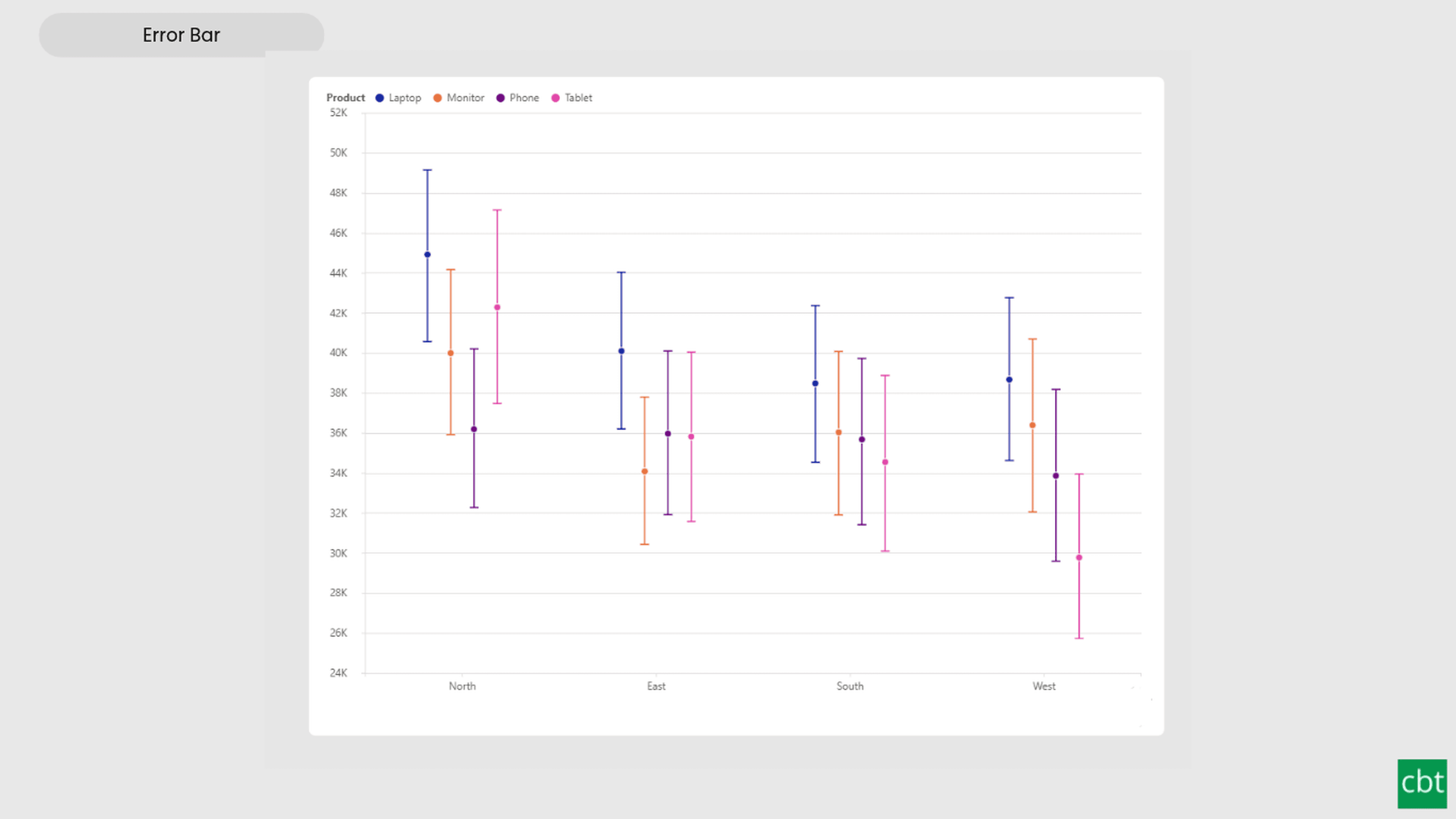
Every category shows a marker at its central value with a whisker running to an upper and a lower bound. A short whisker is a precise estimate; a long one is uncertain. When two intervals overlap, the difference between them may be noise; when they clear each other, it is more likely real.
The visual takes its bounds two ways. Supply your own Upper and Lower measures or hand it raw row-level values and it computes the interval itself - a 90, 95 or 99% confidence interval, standard error, standard deviation, interquartile range or percentile range, around a mean or median, with no DAX. It handles zero- and single-row cases and posts a short notice when the data shape blocks the chosen interval.
A reference line - at zero, the mean, a target field or a custom value - can colour each interval by whether it sits below, crosses or clears the line. Power BI's native error bars are limited to a few chart types and a few built-in bounds; this is a standalone dot-and-whisker chart with the statistics built in, full interactivity, drill-down, and currency and percentage formats read straight from the data model.
Use Cases • Compare group means fairly - do the confidence intervals overlap or not • Forecasts shown with a high-low range • Measurement or process values against a tolerance band • A/B and experiment results with their uncertainty • Survey estimates with a margin of error • KPI versus target, with the reference line marking the goal
What ships today, what’s next.
Available now15 capabilities
- Explicit bounds, or confidence intervals computed from raw rows
- 90/95/99% CI, SEM, SD, IQR or percentile range (mean or median)
- Reference line at zero, mean, target field or custom value
- Reference-line cross colouring (below / crosses / above)
- Marker shape, size, colour, opacity and outline
- Whisker as line or shaded band, with cap styles
- Grouped side-by-side intervals with legend and series colours
- Horizontal or vertical, with logarithmic scale and full axis control
- Data labels for point and/or bounds; currency and percent formats
- Interval notices when the data shape blocks the interval
- Drill down and up with multiple category fields
- Selection, cross-highlighting, bookmarks, context menu
- Rich tooltips with n, SD and interval method
- High-contrast mode support
- Landing page quick-start guidance
On the roadmap2 planned
- A connecting line
- Dynamic format strings.
Other custom visuals.
25 more visuals in the catalogue. All free to download.
Dual Hierarchy Decomposition Tree Pro
DAX-driven KPI tree with dual-axis drill-down, per-KPI colors, icons, and Microsoft-certified Pro features.
Learn more →Advanced Sankey Diagram
Interactive Power BI Sankey diagram for visualizing multi-stage flow data, with automatic node-to-ribbon color gradients and rule-based conditional formatting.
Learn more →Sparkline KPI Card
KPI Card with Sparkline for Power BI that displays KPI values, previous period comparisons, targets, variance, trend indicators, and interactive sparklines in a compact, business-ready visual.
Learn more →Cluster Analysis Chart
A scatter plot that groups points into clusters by similarity using K-Means, DBSCAN, or Hierarchical clustering. Shows centroids, hulls, ellipses, outliers, and dendrograms, with no R or Python.
Learn more →Lollipop Chart
Compare one value across many categories with clean stems and markers on a shared scale, and track each category against its target.
Learn more →Bullet Chart
Compare performance against multiple targets with qualitative bands, variance, and small multiples.
Learn more →Advanced Gantt Chart
Interactive Gantt chart for visualizing hierarchical project schedules, with automatic parent task rollups, dual baseline and actual timeline bars, and rule-based conditional formatting.
Learn more →Radial Histogram
Interactive radial histogram, wedges radiating from a center point, area-correct by default.
Learn more →Pareto Chart
Sort causes largest first, accumulate them, and mark the vital few that reach your threshold.
Learn more →Win Loss Chart
A win/loss sparkline for Power BI. Each period is one equal-sized mark above or below a baseline, so streaks and form are visible at a glance across many rows at once.
Learn more →Waffle Chart
Show part-to-whole proportions, track progress toward targets, or break totals by category.
Learn more →Connected Scatter Plot
It plots two measures against each other and joins the points in time order, so the path, its direction and its turning points are visible at a glance, by group or in small multiples.
Learn more →Histogram
Interactive histogram for visualizing the distribution of a continuous measure, with flexible binning, weighted bin heights, and built in statistical overlays.
Learn more →Dual Axis Bar & Column Chart
Plot two measures on independent scales without dropping in a separate combo chart.
Learn more →Dual Hierarchy Decomposition Tree
Up to four KPIs per card across two hierarchy axes, with DAX-driven status colours.
Learn more →Multi KPI Decomposition Tree
Decompose up to five measures per node, with stacked bars on every branch.
Learn more →Arabic Matrix Table
Right-to-left matrix with Arabic labels, hierarchical rows, subtotals and grand totals.
Learn more →Arabic Stacked Bar Chart
RTL-native stacked bars with Arabic number units, small multiples and cross-filtering.
Learn more →Arabic Stacked Column Chart
RTL-native stacked columns matched to the Arabic Bar visual for consistent dashboards.
Learn more →Arabic Waterfall Chart
Sequential value walk for Arabic dashboards — variance, build-up and bridge analyses.
Learn more →Dumbbell Chart
Two markers per category on a shared scale, connected by a line that makes the gap immediately visible.
Learn more →Counts Plot
Visualise data distribution with dots scaled by frequency across category lanes.
Learn more →Jitter Plot
Show every data point with jitter or beeswarm layout for distribution analysis.
Learn more →Auto Single Select Slicer
Smart Power BI slicer with automatic first-value selection — reports never load with an empty filter.
Learn more →AutoSelect Slicer
Smart Power BI slicer with automatic selection across single-select and multi-select scenarios.
Learn more →Need a custom Power BI visual built for your reporting?
Thirty minutes with a senior BI consultant. We’ll walk your report, scope the visual, and tell you whether a build makes sense.